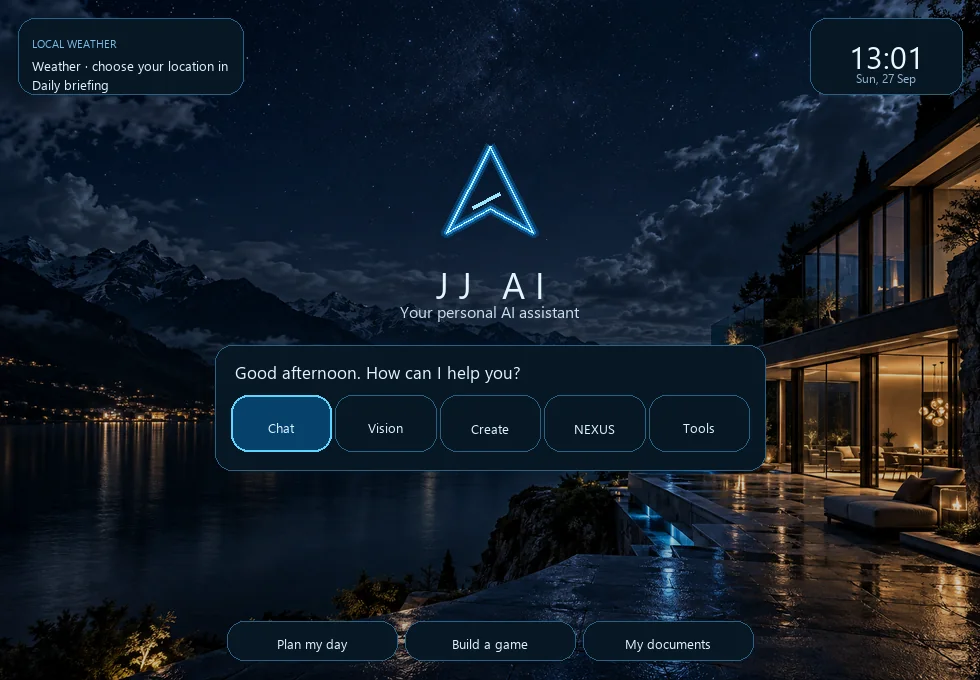
Separate chat threads can be switched independently, with conversation history and project context saved for later.
01 / Project overview
A desktop assistant shaped around JJ’s own interface.
I developed JJ AI / NEXUS as a personal Windows assistant, iterating on the interface while connecting chat, voice, productivity panels and desktop tools. The dark blue visual system, cyan JJ mark and mountain-lake backdrop give the project a recognizable identity.
My focus has been connecting a wide range of capabilities in one application while keeping conversations, project context and local data usable across updates.
02 / Core experience
Chat, voice and everyday desktop tools.
The project includes speech recognition, Piper speech output, wake-word listening and a configurable manual-listen shortcut. Microphone and background listening require Windows permissions and JJ to remain running.
The application includes tools such as notes, reminders, timers, calendar, contacts and college or homework panels.
Project walkthroughs and coding guidance are designed to break work into practical stages. Responses depend on the AI model configured on that PC.
Media controls, screen tools and Windows integrations are available depending on local setup, permissions and the target application.
A JSON backup and restore workflow helps preserve local project data when updating JJ.
03 / Optional hand control
Webcam gestures, isolated from the main setup.
An optional hand-control module uses its own Python environment so webcam and gesture dependencies stay separate from JJ’s main application environment. The described controls include cursor movement, pinch-and-drag, index-finger flick for a left click, two-hand resize or zoom, calibration and monitor-aware window transfer.
Gesture controls are optional and need a connected webcam and local setup. The project notes recommend practicing in the playground before controlling the desktop.
04 / Mobile companion
JJ Mobile connects while the desktop is running.
The current desktop source includes a small mobile web server configured for port 8765. A phone must be on the same local network and the JJ PC application must be running and reachable. This local companion setup does not let JJ control the PC when it is switched off.
JJ Pocket / mobile companion pageSee the separate phone-interface project entry and its version notes.↗05 / Engineering and tools
Built and extended in Python.
The supplied source package contains the Windows desktop application and a separate hand-control module. Project notes describe the assistant’s configured speech and local-AI components as optional, so exact integrations can vary between PCs.
PythonTkinterJSON persistenceSpeech recognitionPiper text-to-speechWake-word listeningWebcam gesture controlWindows automation
Configuration note: Microphone, webcam, Spotify/media controls, local AI models, startup behavior and other Windows integrations depend on the installed components, permissions and settings.
06 / Validation
Offline logic checks, with real-device work still open.
The supplied project handoff reports successful Python syntax compilation and offline checks for project persistence and hand-control logic. It records 113 offline hand-control checks, including cursor-position retention after tracking loss and index-flick click behavior. Those checks do not validate live camera, microphone, startup appearance or real application control.
113
Offline hand-control checks reported in the supplied project handoff. Live microphone, webcam and Windows-control behavior still require local end-to-end testing.